
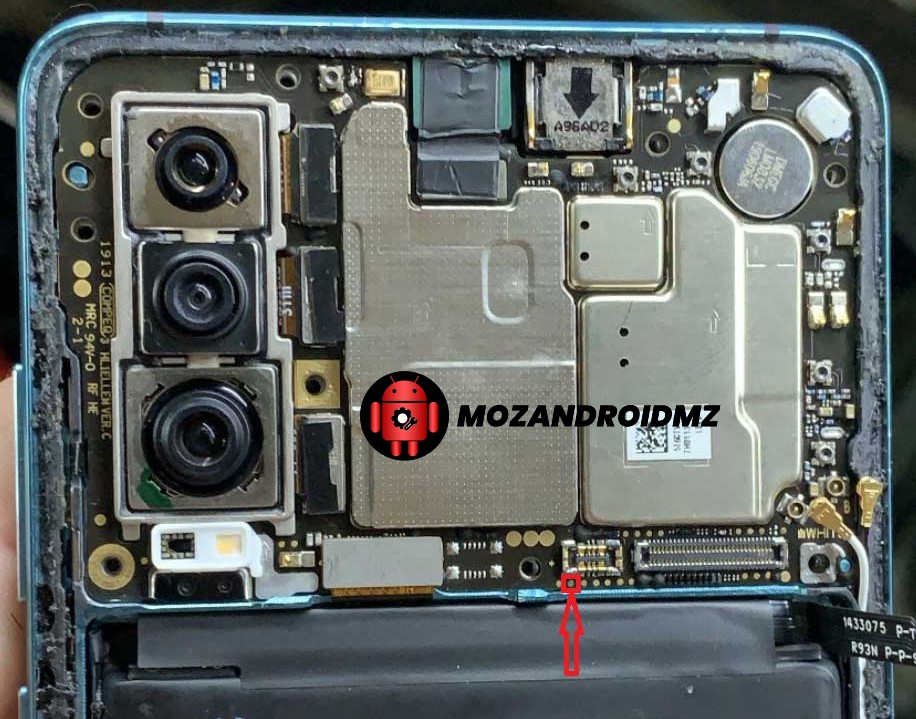
Huawei P30 ELE-L29, ELE-L09 Testpoint
Huawei P30 It is powered by Kirin 980 processor. But if you’re one of the Huawei P30 ELE-L29, ELE-L09 users and want to find out Test Point to Remove FRP lock, Huawei ID, User Lock, and Firmware Flashing then follow this article.
Here we’ll gonna share how you can find out the Huawei P30 ELE-L29, ELE-L09 Test Point, or get into the Download Mode (Emergency Download Mode) so that you can perform multiple advanced level tasks by yourself. You can basically use this test point in any box-like tools such as the Sigma Key, MRT key tool, UFI, UMT, Medusa. All you need is to just shoot the gold point to the ground and then connect a USB cable.
Why Do We Need TestPoint?
- Install the firmware file on Huawei P30.
- You can remove Huawei ID using Test Point
- Repair IMEI and NVRAM using it
- Restore or Unbrick dead Huawei P30 by flashing firmware.
- Easy to remove FRP lock or screen lock
Now, check the screenshot below to find out the Huawei P30 Test Points.


2 Comentários
xgrrvx
Excellent read, I just passed this onto a friend who was doing a little research on that. And he just bought me lunch since I found it for him smile So let me rephrase that: Thank you for lunch! “A human being has a natural desire to have more of a good thing than he needs.” by Mark Twain.